
最近看到很多水友在刷机过程中变砖(一般是在刷过度固件时变砖,这时候都没有备份原厂固件),我个人看了一些帖子总结了一下备份原厂固件的方法……本人也是半桶水,有说错的地方希望大家指正!(特别感谢@phitools 制作的Telnet激活工具)
废话不多说,let's go……
开启telnet:
按phitools大佬的激活工具开启telnet,地址:https://www.right.com.cn/forum/thread-321483-1-1.html(必须)
备份固件:
1、分区备份
telnet连接K2T,按如下操作输入命令:
(1)将固件保存到内存
或
(2)将内存中固件映射到http目录
(3)下载固件到计算机
192.168.2.1为K2T地址,如你已修改,则更改此地址
照此方法依次备份mtd0、mtd1、mtd2、……mtd8分区
此处复制一下 @2049843684 在某贴中的命令
cd /tmp
===================Backup====================
cat /dev/mtd0 > /tmp/u-boot.bin
cat /dev/mtd1 > /tmp/config.bin
cat /dev/mtd2 > /tmp/permanent.bin
cat /dev/mtd3 > /tmp/kernel.bin
cat /dev/mtd4 > /tmp/rootfs.bin
cat /dev/mtd5 > /tmp/rootfs_data.bin
cat /dev/mtd6 > /tmp/art.bin
cat /dev/mtd7 > /tmp/firmware.bin
cat /dev/mtd8 > /tmp/spi0.1.bin
===========将内存固件映射到http目录==========
cd /www
touch u-boot.bin
touch config.bin
touch permanent.bin
touch kernel.bin
touch rootfs.bin
touch rootfs_data.bin
touch art.bin
touch firmware.bin
touch spi0.1.bin
mount --bind /tmp/u-boot.bin/www/u-boot.bin
mount --bind /tmp/config.bin/www/config.bin
mount --bind /tmp/permanent.bin/www/permanent.bin
mount --bind /tmp/kernel.bin/www/kernel.bin
mount --bind /tmp/rootfs.bin /www/rootfs.bin
mount --bind /tmp/rootfs_data.bin/www/rootfs_data.bin
mount --bind /tmp/art.bin /www/art.bin
mount --bind /tmp/firmware.bin/www/firmware.bin
mount --bind /tmp/spi0.1.bin/www/spi0.1.bin
==================Download====================
http://192.168.2.1/u-boot.bin
http://192.168.2.1/config.bin
http://192.168.2.1/permanent.bin
http://192.168.2.1/kernel.bin
http://192.168.2.1/rootfs.bin
http://192.168.2.1/rootfs_data.bin
http://192.168.2.1/art.bin
http://192.168.2.1/firmware.bin
http://192.168.2.1/spi0.1.bin
firmware.bin备份前建议重启一下路由器或"rm/tmp/*.bin"删除bin文件,否则可能会死机
2、编程器固件备份
1.telnet连接K2T,按如下操作输入命令:
2.下载固件到计算机
计算机访问
注意:编程器固件大小应该为16777216字节。
方法二:
1、开启telnet后,telnet连接K2T,按如下操作输入命令开启SSH并修改密码为admin:
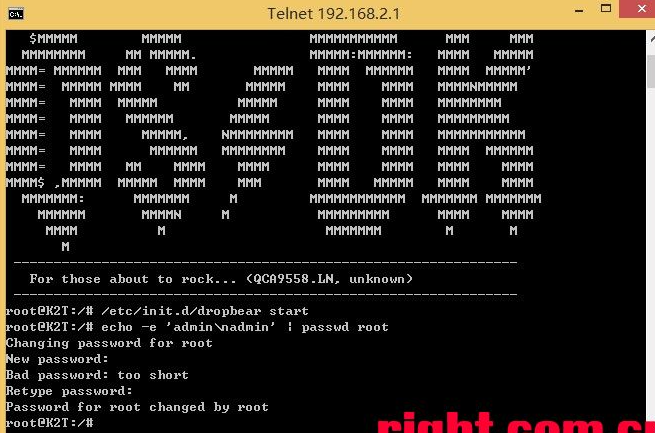
2、将固件保存到内存:方法一“分区备份”中第(1)步和编程器固件备份中第(1)步
3、通过winscp进入tmp目录将固件下载下来(用户名root,密码admin)
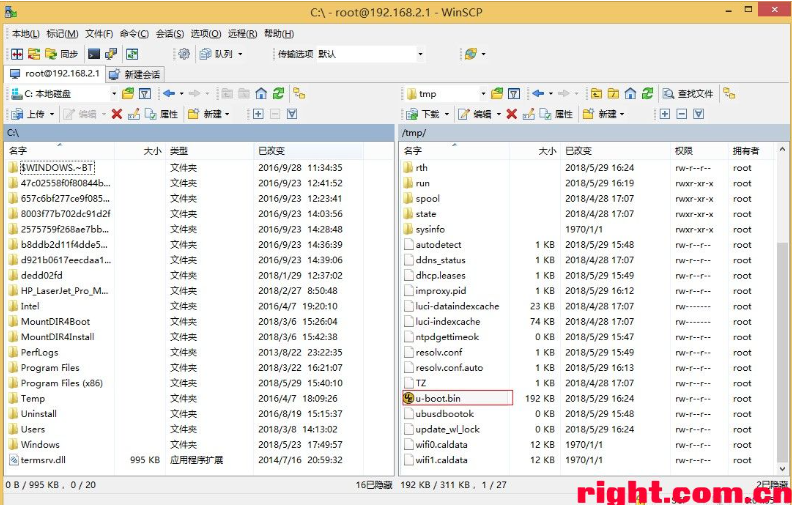
至此,固件备份完成,接下来可以放心刷机了……!
已有 99 位网友参与,快来吐槽:
发表评论